Community Goals
Community Goals let your server pool credits toward one shared reward, event, unlock, or improvement. Instead of members spending credits only on themselves, they can contribute to a public target the whole community is working toward.
For admins, goals are a way to turn saved-up credits into coordinated momentum. They work especially well for things like unlocking a special event, funding a giveaway, opening a temporary perk, or letting the community vote on what gets unlocked next.
Commands
/goals manage   - create, edit, post, and resolve goals (mod/admin only)
/goals view     - view active goals and donate as a member
What a Goal Includes
Every goal has four core pieces:
Name - The title members see in /goals view and on the public goal post.
Target Amount - How many credits the community needs to contribute before the goal is complete.
Reward Text - The description of what the server unlocks when the goal is completed.
Expiration (optional) - How long the goal stays active before staff must review it.
Limits
Free servers
- 1 active goal at a time
- Goal name: up to 50 characters
- Reward text: up to 100 characters
- Expiration: up to 30 days
Premium / Whitelabel servers
- 10 active goals at a time
- Goal name: up to 100 characters
- Reward text: up to 200 characters
- Expiration: up to 1 year
- Live updates for posted goal messages
Managing Goals
Open /goals manage to access the goal manager.
From there, you can:
- create a new goal
- edit an active goal
- post or repost the public goal message
- view the public post
- end a goal early
- resolve expired goals that need a refund decision
Creating a Goal
Click Create Goal and fill in:
Name - The public title of the goal.
Target Amount - The total number of credits the community needs to raise.
Reward Text - What members are working toward. This should clearly explain what the server team will deliver when the goal completes.
Expiration (optional) - A duration such as 7 days, 1mo, 24h, or 30m.
Goal names must be unique among active goals in the same server.
Editing a Goal
Use Edit on an active goal to update its name, target, reward text, or expiration.
If you lower the target below the amount already raised, the goal completes immediately.
Posting the Goal Message
Creating a goal saves it in the manager, but members usually need a public post to discover it easily.
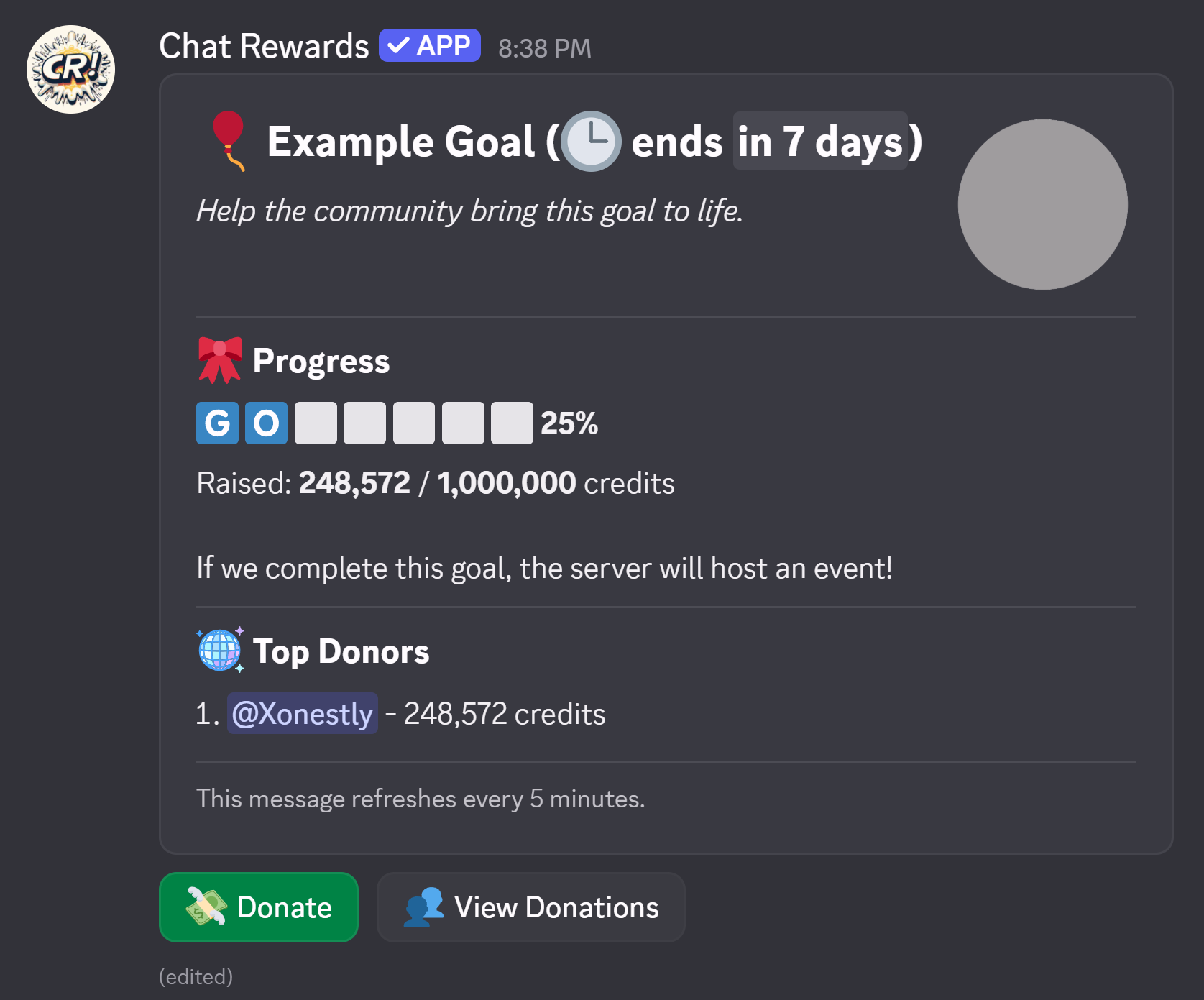
Use Post Goal to choose a channel and publish the goal message. The public post shows:
- the goal title and reward
- a progress bar and raised amount
- the top donors leaderboard
- a Donate button
- a View Donations button
If a goal already has a public post, the button becomes Resend. This lets you move the post to another channel or refresh it manually.
Post community goals in a channel most members can read, such as a community hub, economy channel, or announcements channel dedicated to server progression.
Live Updates
Premium and Whitelabel servers can enable live updates when posting or resending a goal.
When live updates are on, the public goal message refreshes automatically every 5 minutes so members can see new progress and donation totals without waiting for a manual repost.
How Donations Work
Members contribute through /goals view or the Donate button on the public goal post.
Each donation:
- deducts credits from the member's balance
- adds that amount to the goal's progress
- updates donor totals and rankings
- counts toward the member's donation stats
Members can only donate credits they already have. Donations are tracked per goal, and the public post can show the top donors.
Completion and Delivery
A goal completes automatically when total donations reach the target amount.
Once a goal is complete:
- the public goal post updates to show completion
- donations stop
- the server team is expected to deliver the reward described in the goal
Chat Rewards tracks the fundraising and completion state, but it does not automatically grant the promised reward. If the goal says the community unlocks a role, event, giveaway, or server upgrade, your staff still needs to carry that out.
Expiration and Refund Decisions
If a goal expires before reaching its target, it moves into a review state in /goals manage.
At that point, staff must choose one of two outcomes:
- Refund donations - returns contributed credits to all donors
- Keep donations / resolve without refund - closes the expired goal without returning credits
This makes expired goals an explicit staff decision instead of silently deleting or refunding them.
Ending a Goal Early
Use the End action in /goals manage when you want to stop an active goal before it reaches its target.
You can either:
- Cancel and refund all donations
- Mark complete without refunding donations
This is useful if the reward is being granted early, the plan changed, or the goal should be retired.
Recommended Uses
Community goals work best when the reward is clear, visible, and shared.
Good examples:
- fund a server-wide giveaway
- unlock a temporary event or special weekend
- open a new shop category or case rotation
- let the community unlock a cosmetic server perk
- raise credits toward a milestone celebration
Avoid vague goals like "something cool later". The more specific the reward text is, the more likely members are to donate.
Related Pages
- Currency Settings - rename your server currency before launching goals
- Shop System - another major credit sink for your economy
- Transfer Limits - useful if you want tighter control over how easily credits move between members
- Logging - track goal creation, completion, expiration, refunds, and other staff actions
- Statistics - review donation-related activity alongside the rest of your server economy
- Mod Role & Permissions - delegate goal management without giving everyone
Manage Server